Copyright ©2018 Deborah M. Zajac. ALL RIGHTS RESERVED
For Valentine’s Day. “)
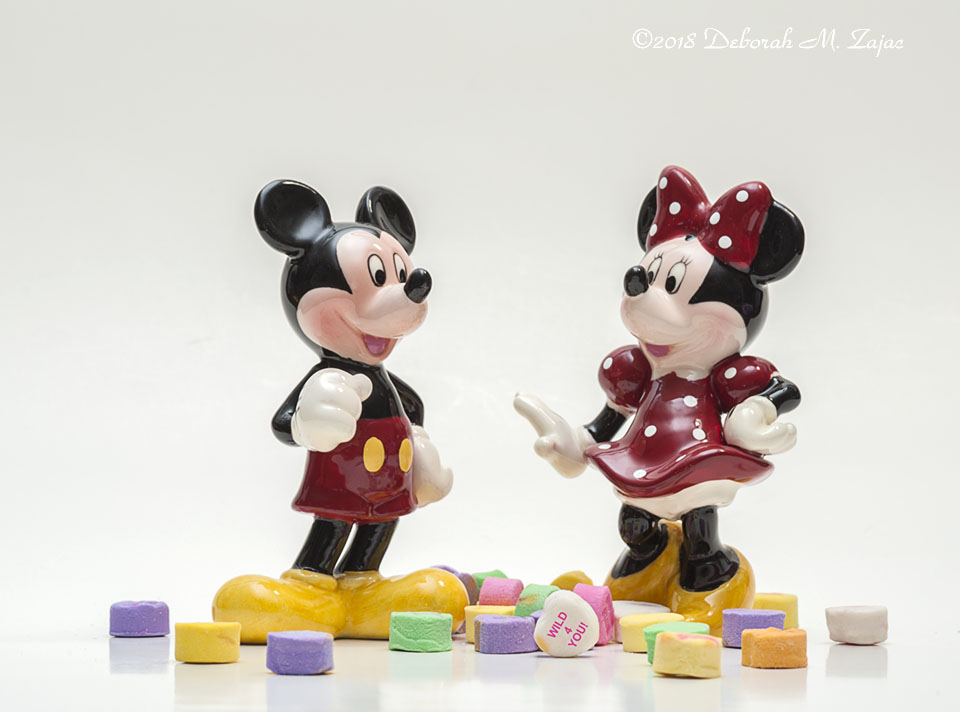
I composed and shot this image back in 2014. Since I hadn’t thought of anything else to compose for today I thought why not publish it for Wild Wednesday?
I did change what the Sweetheart said to fit both of today’s themes using Photoshop CC. Here’s a quick run down on how I did that in case you’d like to know how I did it.
Firstly, I created a new layer then I grabbed the spot removal tool and erased what the Sweetheart said.
Next, I grabbed the Horizontal Text Tool and switched my paint/text color to bright pink, changed the font size to 6pt I think it was then I typed the first line WILD. Then I summoned the Free Transform Tool to turn the text to the right direction, then summoning the move tool I moved it into place.
I did that two more times for the number 4, and word YOU!. Then I saved the whole thing as a PSD file. After that I added a new layer and cleaned up a few specular highlights on the ceramic figures then I merged the layers, resized it for the web, added my watermark, and saved it as a JPEG.
There is more than one to change the word on something like this, and probably an easier way too, but that’s how I did it. 🙂
I hope you all have a sweet day!
Nikon D700| Nikkor 105mm| Lexar Digital Film| Continuous Lights right and left with light modifiers| PS CC 2018
more to come…
 Circadianreflections Blog
So cute, Daborah! Have to read this again to let it sink in more -always fun to learn more about photo shop:) Did you go on any photo excursions lately? It’s cold here, so I don’t come further than my yard, lol!
LikeLike
This antique set of Mickey and Minnie are precious! 💘
The technical work you did to change the message was so amazing and you have patience!!
LikeLike
I enjoyed hearing how you created this in photoshop, Deborah! ❤️ Something I’d like to learn more how to do. I took a class several years ago. I’m on the computer all day for work so would rather create art I guess when I’m not working… but I also like to do my blog! Priorities I guess! 😉 Lol! I love Mickey and Minnie Mouse! 💕❤️
LikeLike
It is SO cute and made me smile when I saw it in my feed 🙂
LikeLiked by 1 person
🙂 Thank you so much! I’m glad it made you smile.
LikeLiked by 1 person
It’s so amazing what can be changed and created through Photoshop. I really need to get in there and try it out. I love the playfulness of this shot Deborah! 🙂
LikeLiked by 1 person
Photoshop is an amazing tool. I only know how to do a little of what it can do.
Thank you so much!
LikeLiked by 1 person
All that work for a seamless result! Nice eork, Deborah!
LikeLiked by 1 person
Thank you so much Gordon!
LikeLike
Cute! Clever girl. 😉💕💐
LikeLiked by 1 person
Thank you! xx
LikeLike
So cute and awesome to know the technical side of it!
LikeLike
Thanks Deborah. I can’t tell you how much I appreciate a lesson like this. Every time I try to look up how to do something in PhotoShop, I get directed to an 8-10 minute video. I like the videos, but sometimes, short and sweet works just fine. Nice job on the photo and the explanation.
LikeLiked by 1 person
Thanks Dan! I thought about going down a longer path, explaining where the tools are in the panel, and how to change the paint color, but thought …”oh that’s not going to be a quick run down then, and possibly confusing. Like going down a rabbit hole!” So, I stuck to the basics.
I like watching video tutorials as well, but they tend to go fast, so I pause, rewind, and replay steps a lot. Which takes up so much time! I really do prefer written step by step directions, with video back up. 🙂
LikeLiked by 1 person
You rock Photoshop! Cute pic. Happy Valentine’s Day, Deborah. 💖
LikeLiked by 1 person
Thank you so much Camie! Happy Valentine’s Day to you too!
LikeLiked by 1 person
great job – and thanks for the little tutorial! Happy Valentine’s Day Deborah!
LikeLiked by 1 person
Thank you Jodi! Happy Valentine’s Day to you too!
LikeLike
Have a ‘wild’ V-Day, Deborah! 🙂
LikeLiked by 1 person
Thank you Donna! I hope you have a lovely Valentine’s Day too!
LikeLiked by 1 person
Happy Valentine’s Day, Deborah! Hope it’s a wild one 😉
LikeLiked by 1 person
Not too wild. 🙂 Hope you have a lovely Valentine’s day too!
LikeLiked by 1 person
Thanks for the instructions. 🙂
LikeLiked by 1 person
My pleasure! Thanks for reading and looking Judy!
LikeLike
Love it, Deborah. And thanks for the how-to. I put PhotoShop on my computer, but haven’t had time to try and learn to use it yet… months later… I got it because I want to make “line drawings” of my images for my Atonement books. I hope to make an adult coloring book. Anyhow, this is adorable. Happy Valentine’s Day hugs!
LikeLiked by 1 person
Thank you so much Teagan! There’s a steep learning curve but worth it if you end up being able to do what you envision doing.
Happy Valentine’s Day to you too! Hugs back at ya! xx
LikeLiked by 1 person
I have Lynda.com through my job. So I’ve found a good tutorial, but I only get to watch it a few minutes a day — and I’m not with my own computer. But based on a few youtube videos I found, there is no simple way to do what I want. It seems complicated even for an expert… let alone a dilettante like me. So definitely a big learning curve.
LikeLike